


Tempest Weather
4.3327.00 Reviews
App Specs
- Version
- v5.10.18
- Updated On
- License
- Free
- Downloads
- 100,000+
- Developer
- WeatherFlow
- Categories
- Weather
- Platform
- Android
Screenshots
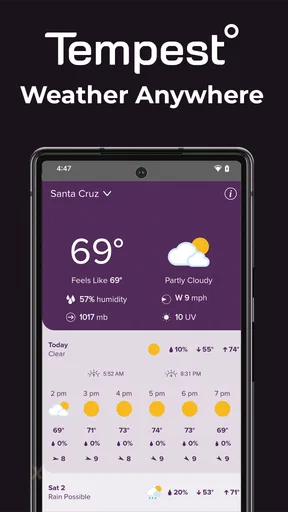
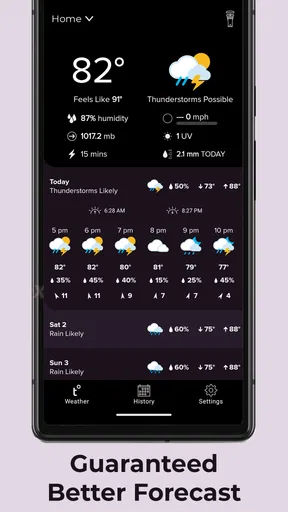
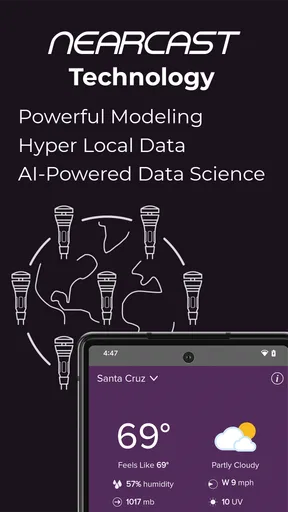
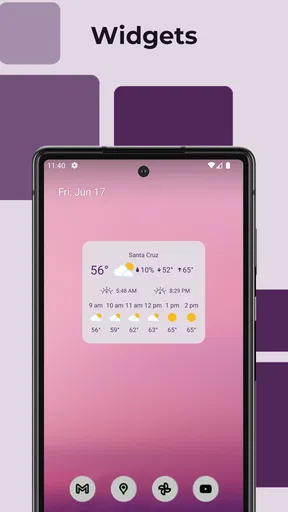
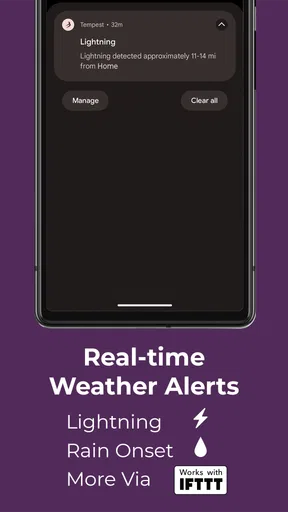
 Analysis by AppCompare
I approached Tempest Weather as someone who wants more than a broad forecast for an entire city. This free weather app from WeatherFlow is designed to work with a Tempest sensor device, so its main appeal is personal, local information rather than a general-purpose forecast that treats every neighborhood alike. That distinction affects almost everything: who will enjoy it, how much value it provides, and whether it makes sense as your only weather tool.
My overall impression is that it is most useful when you already have access to the compatible sensor and care about conditions around your home, garden, workplace, or another fixed location. Without that device, the reason to choose this particular app is much weaker. With one, the experience becomes more practical because you can use the app as a window into the weather where the sensor actually sits, rather than relying only on a distant reporting station.
WeatherFlow has kept the app available at no cost, with an Everyone content rating. It has passed the 100K+ install mark and holds a 4.3 average from around 699 ratings, alongside roughly 327 written reviews. Those figures suggest a healthy user base, but they do not change the central question: whether a sensor-based weather experience fits your routine.
How Tempest Weather works in everyday use
I find the most useful way to approach Tempest Weather is as a check on a place you care about, not as a substitute for every forecast you might need. When I plan around home, I can use a local reading to question whether a broad forecast really fits conditions on the ground; that distinction becomes especially helpful when deciding whether an outdoor task can wait.
Readability and navigation for quick weather checks
The strongest part of a weather app should be the moment you open it and need an answer quickly. Tempest Weather is built around that kind of glanceable use. Instead of making the app feel like a news feed filled with unrelated weather stories, its purpose is to help you understand conditions connected to your Tempest setup.
That focus can make the experience easier to interpret than a conventional weather app with several competing locations, maps, articles, alerts, and promotional panels. If your question is “What is happening at my property right now?” a sensor-centered layout is naturally more relevant than a screen dominated by regional averages.
I also see a benefit for people who find dense weather interfaces tiring. Weather information often becomes difficult when temperature, wind, rain, humidity, and forecast details are presented with too many colors and tiny labels. A local dashboard can reduce the need to compare several sources. You are looking at one place and one set of conditions, which is a simpler mental model.
Worth Reading Before You Choose

EA SPORTS FC Mobile 26 Is a Bigger Football Game, but It Takes Time

Flipboard Shows What News Apps Must Do Beyond the Feed

Switching to Android Auto Means Rethinking Your Driving Routine

Google Calendar Makes a Crowded Week Easier to Manage

Ludo King Makes the Most of the Minutes Between Plans

Baby Panda World Brings Quick Play to Modern Phones, but Its Game Library Feels Busy
That said, simplicity depends on your expectations. Someone accustomed to a large radar map or a long hourly forecast may initially find a sensor-focused app less familiar. The app is not trying to replace every weather service in one screen. Its value comes from local observation and the forecast connected to that observation, not from offering an encyclopedic collection of weather tools.
For readability, I would use the app in short sessions rather than assume it is a full planning workspace. Check it before opening the door, starting outdoor work, watering plants, or leaving for a walk. This habit makes its local focus useful and avoids turning every weather check into a search through unnecessary information.
Why local data changes the way I interpret forecasts
A regional forecast can be perfectly reasonable and still feel wrong at your address. Rain may stop on one side of town while another street remains wet. Wind can be much stronger near an open field than beside a row of buildings. A sensor at your own location gives the app a more immediate reference point for what is actually happening there.
This is especially helpful for people whose decisions depend on small changes. I can imagine using it before painting outdoors, planning a barbecue, checking whether a greenhouse needs attention, or deciding if laundry should stay inside. In these situations, the difference between “rain nearby” and “rain here” matters more than a polished nationwide forecast.
One useful workflow is to check the app twice: once before making a plan and again shortly before acting. The first check helps you decide whether the plan is sensible; the second confirms whether conditions have shifted. This is more practical than treating any forecast as a promise, particularly when weather changes quickly.
The key advantage is not simply more weather information; it is information tied to the place where you make decisions. That is the reason I would recommend the app to a sensor owner, while I would hesitate to recommend it to someone seeking a standard forecast app for travel across many locations.
Motor and sensory considerations
Weather apps are generally used with one hand, often while standing outside, carrying groceries, holding a leash, or trying to make a quick decision. Tempest Weather suits that kind of brief interaction better than a tool that requires complicated data entry. The sensor does the observing, so the user does not need to repeatedly type readings or manually record conditions.
That reduction in physical effort is meaningful. A person with limited dexterity, hand pain, or difficulty performing precise gestures may prefer an app that mainly presents information instead of asking for frequent input. A fixed sensor also removes the need to walk outside with a separate instrument every time you want a local reading.
There are still practical considerations. Any weather app can become harder to use when text, icons, or visual distinctions are small, especially in bright sunlight or when the phone is being viewed quickly. I would not assume that a sensor-based design automatically solves every visual or motor challenge. The best experience will depend on the phone’s own display settings, zoom options, text scaling, and the user’s comfort with the interface.
For users with low vision or color-vision differences, I would pay attention to whether important changes are communicated through more than color alone. Weather information should ideally be understandable from labels and values, not just a shift from one shade to another. If a critical condition is difficult to distinguish visually, a general app with clearer text-first presentation may be a better companion.
People with hearing loss may appreciate that the main activity is visual checking rather than listening for spoken updates. Conversely, anyone who relies heavily on audio access should test how comfortably the app works with the accessibility tools already built into their phone. I would treat that as an important part of choosing it, because local sensor support does not by itself guarantee that every screen will be equally comfortable with a screen reader or magnification.
For users with cognitive or attention-related needs, the narrow purpose can be a strength. There are fewer reasons to wander through unrelated content, and the app can become part of a predictable routine: open it, check the local conditions, decide what to do, and close it. The trade-off is that people who need a single screen combining travel forecasts, severe-weather context, radar, and multiple saved locations may find the focused approach limiting.
Situational access at home, work, and outdoors
The most convincing use case is a fixed location that influences your daily choices. Imagine waking up on a weekend and planning to repair a fence. A broad forecast may say the day is suitable, but a local sensor view can help you decide whether the wind and current conditions around your property make the task sensible. Later, you can check again before taking tools outside rather than relying on the morning forecast alone.
Gardeners may find the same workflow useful. Instead of guessing from a city-level forecast, they can look at conditions associated with the place where plants are growing. This does not remove the need for judgment, but it gives a more relevant starting point for watering, covering plants, or postponing delicate work.
Families can also use the app as a shared reference for outdoor routines. Before a child’s playtime, a dog walk, or a visit from friends, one local check can be easier than comparing several generic weather services. The benefit is strongest when everyone is deciding about the same property and the sensor remains in a sensible location.
For accessibility, fixed-location use can reduce travel and physical exposure. Someone who finds it difficult to go outside repeatedly, or who needs to avoid unpleasant conditions before committing to a trip across the yard, can check first from indoors. That is a modest but genuinely useful form of situational access.
Remote monitoring is another reason a sensor owner might keep the app available. If you are away from home, the local station can help you understand what is happening at the property rather than only what is happening where you are standing. I would still use common sense for serious decisions, but this can be reassuring for people managing gardens, outdoor equipment, or a second property.
Travelers should look at the app differently. If you want forecasts for a holiday itinerary, airport transfers, or several cities, a mainstream weather app with broad location search may be more convenient. Tempest Weather makes the most sense when the important place is the one connected to your sensor, not every place you may visit during the day.
Where the app creates friction
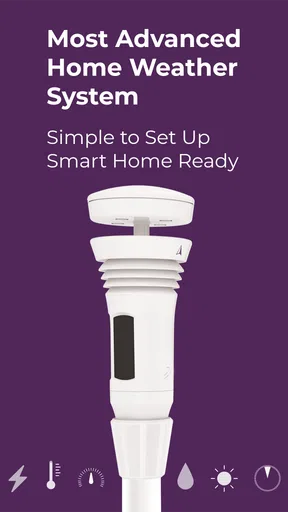
The biggest barrier is the hardware relationship. The app is intended for use with a Tempest sensor device, so it is not the obvious choice for someone who simply wants a free forecast after installing an app. Before committing to it as part of your routine, make sure the sensor-based setup matches your needs and that you are comfortable depending on a device located at a particular site.
This also changes the cost conversation. The app itself is free, but a free download does not mean the complete experience is hardware-free. If you do not already have the compatible sensor, the total commitment is different from installing an ordinary forecast app and using it immediately. That is an important distinction for anyone comparing options on a tight budget.
A second limitation is location flexibility. A sensor gives you excellent relevance at its own location, but it cannot automatically turn the app into a universal weather guide for every destination. If your daily life involves moving between neighborhoods, job sites, or campuses, you may still need another weather service for the places outside the sensor’s reach.
There is also a human factor: sensor placement matters. A reading from a sheltered corner, a roof, a balcony, or an area affected by nearby structures may not represent the conditions you feel elsewhere on the property. I would treat the installation location as part of the app experience, not as a one-time detail to forget. If the results seem surprising, first consider whether the physical setup explains the difference.
Forecast confidence is another reason to avoid overreliance. Local observations can make current conditions more meaningful, but no app should be treated as an unquestionable authority for dangerous weather or high-stakes decisions. For storms, travel safety, worksite planning, or medical sensitivities, I would compare the app with official warnings and use the more cautious interpretation.
People who want rich visual maps may also feel constrained. A radar-centered service is better when the question is where a rain band is moving. A travel-oriented app is better when the question is what to expect across several stops. Tempest Weather is more specialized: its strength is the relationship between the app, the local sensor, and the place you care about most.
Who should choose it, and who should skip it?
I would choose Tempest Weather if I owned a Tempest sensor, spent a lot of time making outdoor decisions at one location, and valued local observations more than a huge collection of general weather features. It is particularly appealing for homeowners, gardeners, outdoor hobbyists, and anyone who wants a repeatable way to check conditions without stepping outside first.
I would also consider it for someone who benefits from reducing physical trips outdoors. The app can support a simple indoor checking routine, which is useful when mobility, fatigue, temperature sensitivity, or caregiving responsibilities make repeated outdoor checks inconvenient.
I would skip it as my primary weather app if I did not plan to use the compatible sensor. I would also look elsewhere if I mainly needed international travel planning, many saved locations, extensive radar analysis, or a conventional forecast experience that works independently of home hardware. In those cases, the usual alternatives are likely to be faster and more flexible.
The app’s maturity is reassuring in a modest way: it was released on October 6, 2017, and the current version is v5.10.18. It supports devices running Android 5.0 or later, which makes it available to people using older Android phones. Still, compatibility alone does not tell me whether every older device will feel equally smooth, so I would keep expectations realistic if the phone has limited performance or a small display.
My inclusive verdict after weighing the trade-offs
Tempest Weather is a focused weather companion rather than a universal replacement for every forecast tool. Its best quality is the way it connects weather checking to a specific place and a physical sensor. That can make everyday decisions more grounded, especially when a city-wide forecast is too broad to answer what is happening at home.
From an inclusion standpoint, its low-input, fixed-location workflow has real promise. It can reduce unnecessary trips outside, support short visual checks, and provide a predictable routine for people who prefer a focused interface. Those benefits are practical rather than decorative, and they become more valuable when weather affects gardening, outdoor work, pets, or household planning.
At the same time, I would not describe it as automatically accessible for everyone. Users who need very large text, strong non-color cues, extensive audio interaction, or highly detailed travel mapping should test the app against their own needs and keep a second service available if necessary. The sensor requirement is also a meaningful barrier for anyone looking for an instant, hardware-free forecast.
My recommendation is therefore conditional but positive: choose it when local, sensor-connected weather is the problem you are trying to solve. Use it as a precise home or property check, combine it with official information for serious conditions, and do not expect it to behave like a broad travel forecast service. For the right user, that specialization is exactly what makes WeatherFlow’s app worthwhile.
Pros
- Clean interface makes forecasts easy to scan at a glance.
- Provides useful weather details beyond basic temperature readings.
- Forecast information updates regularly for changing conditions.
- Helpful for planning commutes
- trips
- and outdoor activities.
- Supports quick access to local weather information.
Cons
- Some advanced features may require a paid subscription.
- Forecast accuracy can vary by location and weather conditions.
- The app may use noticeable battery for frequent location updates.
- Limited usefulness in areas with sparse weather-station coverage.
- Some users may find alerts or notifications overly frequent.
FAQs for Tempest Weather
What is Tempest Weather, and what does it offer?
Tempest Weather is a weather app designed to provide current conditions, forecasts, radar-style weather information, alerts, and other atmospheric details in one place. Its usefulness depends on the data sources and connected weather hardware available in your region. Before downloading, users should check which features are supported locally and whether the app works best with a Tempest weather station or can be used independently.
Does Tempest Weather require a Tempest weather station to work?
The app is primarily associated with Tempest weather stations, so some of its most detailed features may require access to a compatible device or station shared by another user. Depending on the version and account setup, basic weather information may still be available without owning hardware. If you want highly localized readings, station data, or advanced measurements, verify the compatibility requirements before installing.
What type of weather information can I view in Tempest Weather?
Tempest Weather can provide more than a simple temperature reading. Depending on the connected station and available services, users may see conditions such as temperature, humidity, wind speed and direction, rainfall, pressure, lightning activity, and forecasts. The exact information can vary by location, station model, permissions, and network connection, so not every feature will appear for every user.
Are Tempest Weather forecasts and alerts accurate enough for daily planning?
Tempest Weather can be helpful for checking local conditions, monitoring changes, and planning everyday activities, especially when paired with a nearby personal weather station. However, no weather app should be treated as infallible. Forecast accuracy changes with location and weather conditions, while alerts may depend on enabled notifications and available data. For severe weather, users should also consult official emergency services.
Is Tempest Weather free, and what permissions does it need?
The app may be available to download without an upfront charge, but certain services, hardware features, or account-related functions can depend on the Tempest ecosystem and its current terms. During setup, it may request permissions such as location, notifications, and network access. Location can improve local weather results, while notifications are important if you want timely warnings and station updates.


